
What is IPv6?
Most Internet traffic runs on IPv4, which allows for 4.3 billion IP addresses. As the Internet has grown exponentially, the IPv4 address space is slowly running out of new addresses. Especially, looking ahead to the Internet of Things and a myriad of new connected devices and appliances, a new solution was needed.
IPv6 is the latest Internet protocol which expands the IP address space to 128 bit, allowing 2128 addresses. Where IPv4 addresses consist of four bytes e.g. 128.4.32.241, IPv6 address consist of eight groups of four hex digits e.g. 2400:6180:0000:00D0:0000:0000:0129:E001.
IPV6 is built with the future in mind.
Network Computing has a nice summary of the benefits of IPv6: more efficient routing and packet handling, more efficient high bandwidth broadcast e.g. multicast, simplified administration and setup and much improved packet security.
According to Wikipedia, only 4% of Internet traffic runs in the IPv6 address space at this time. Unless you work for a corporation with a dedicated IPv6 network, you probably don't need to worry much about it for several years. But, if you'd like to get up to speed on IPv6, this tutorial will explain how you can inexpensively host an IPv6 website and grow your expertise.
Finding IPv6 Infrastructure
In this tutorial, we're going to show you how to set up an IPv6 server in the cloud at Digital Ocean, which recently began offering IPv6 for no additional cost with their Singapore and New York city-based regions.
Here's some of the reasons I like Digital Ocean: low cost hosting, fast solid-state digital drives, simple web-based administration, very good support, and IPv6 capabilities.
Whether you can access your new website over IPv6 is not really the point here. I'm just trying to show you how to set it up and configure it, giving you some exposure to how IPv6 works. Actually accessing your site via IPv6 requires IPv6 compatible hardware and more importantly an IPv6 compatible network - which you probably don't have.
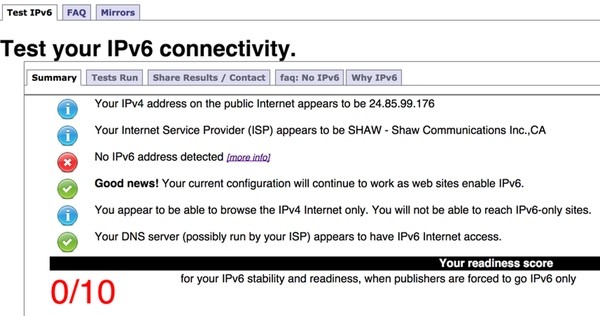
You can check if your current network connection supports IPv6 at Test-IPv6.com.
In 2010, I wrote about buying your own cable or DSL modem for home to save on monthly rental fees. For home, eventually, you will need a modem that is DOCSIS 3.0 compliant to work with IPv6. Wikipedia maintains a list of IPv6 compatible devices.
Note that if you're setting up your own super-geek IPv6 intranet at home in your basement, you'll probably need one now.
Creating Your IPv6 Enabled Server Instance
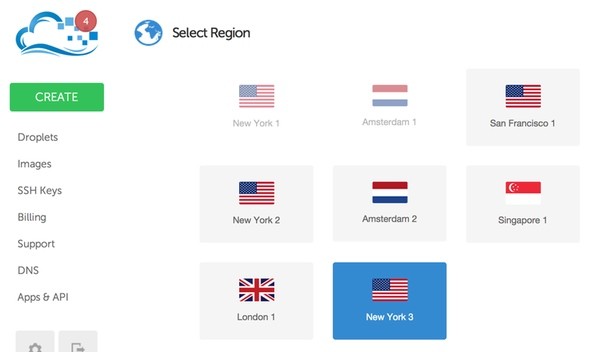
This tutorial will follow these WordPress installation instructions for Digital Ocean, except you will need to create an IPv6 enabled droplet in the New York 3 region as shown below.
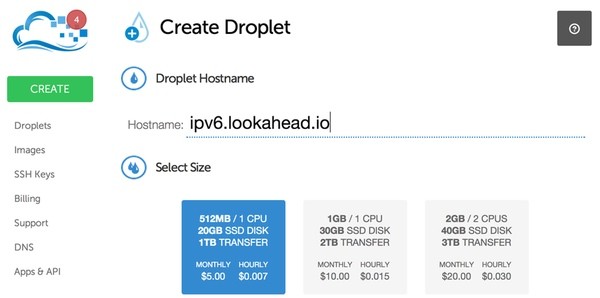
Create Your Droplet
Once you've signed up for Digital Ocean, you'll want to create a droplet:
Select the New York 3 Region (it's the one enabled for IPv6):
Select the LAMP Application and IPv6:
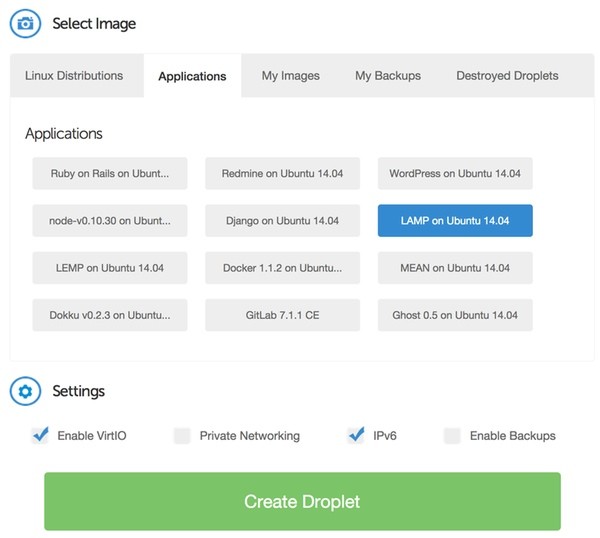
Follow the remaining steps described in the tutorial to install your WordPress site or set up your own sample Apache site. For purposes of this tutorial, the actual web site you use doesn't matter. You can even use the default Apache site.
Configure Your IPv6 DNS Record
Once Digital Ocean creates your Droplet, they will email you access credentials and IP addresses. Below the usual IPv4 address, there will be IPv6 addressing information:
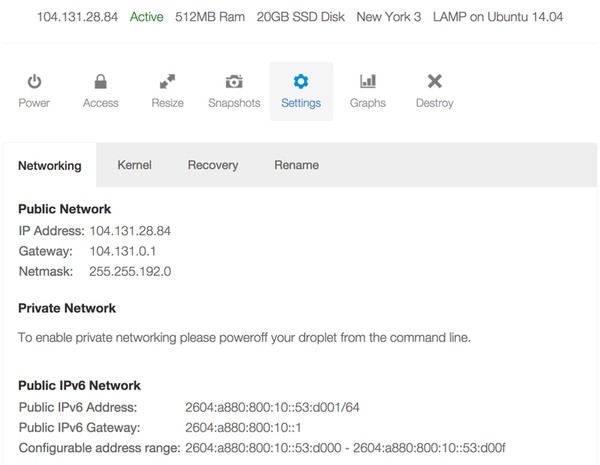
In an IPv6 address such as 2604:a880:800:10::53:d001, the :: represents groups of four zeroes. Each colon is essentially shorthand for four zeroes.
If the IPv6 information is missing, you may have created your droplet outside the NewYork3 or Singapore regions.
Note that if you'd like to configure IPv6 on an existing server, Digital Ocean has a tutorial for that.
Then, with your domain name service, add a AAAA record, the addressing record for IPv6 addresses (as opposed to A records for IPv4). You can use the same domain and sub-domain for IPv6 as IPv4:
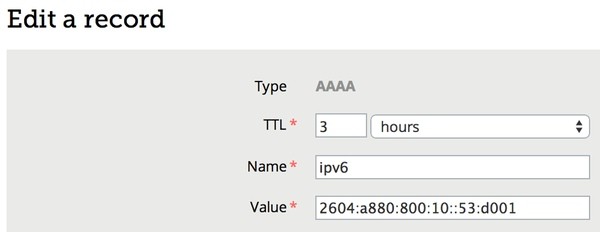
Once your domain name record has propagated, you can check the record from your server:
host -t AAAA ipv6.lookahead.io
You'll see something like this:
ipv6.lookahead.io has IPv6 address 2604:a880:800:10::53:d001
Verify Your IPv6 Connectivity
If you have end to end IPv6 network access on your local computer, you can do this to ping the new droplet, note we're using ping6, not ping:
ping6 2604:a880:800:10::53:d001
Most likely though, you will need to log in to your droplet via IPv4 and check the IPv6 configuration from there.
Run the ip command with the -6 option, you should see at least two entries:
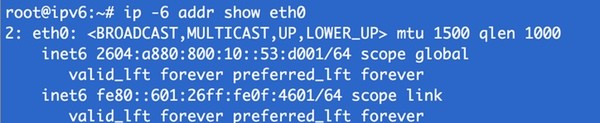
Then, you can ping Google's public IPv6 name services (note we're using ping6):
ping6 2001:4860:4860::8888

A successful ping response shows that your IPv6 connectivity is active.
You can also run a traceroute to Google (note, we're using traceroute6):
traceroute6 google.com
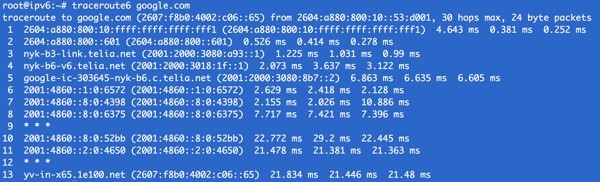
Or, a dig (note the trailing AAAA for IPv6):
dig ipv6.lookahead.io AAAA
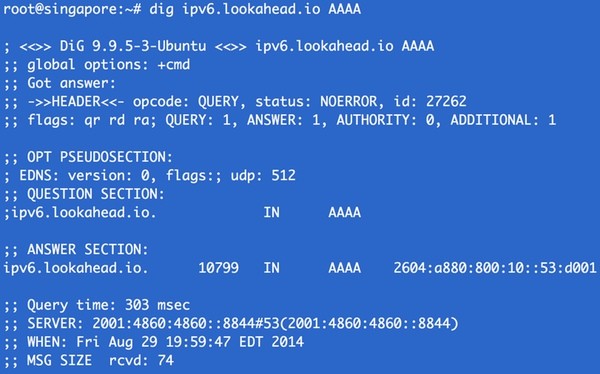
Digital Ocean has another guide to these networking tools here.
Configuring Apache for IPv6
Once you've set up WordPress or any Apache testing website, you can configure Apache to listen publicly on your IPv6 address:
nano /etc/apache2/ports.conf
Add the following lines with your IPv4 and IPv6 addresses:
Listen 104.131.28.84:80
Listen [2604:a880:800:10::53:d001]:80
Reload Apache and try accessing your website via IPv4.
service apache2 reload
Then, comment out the IPv4 Listen line (e.g. #Listen) and reload apache again. Now, you won't be able to access the site via IPv4.
Testing from Your Own IPv6 Cloud-Based Network
For fun, I've created a second IPv6 droplet at Digital Ocean - following the same instructions above. One of the cool things about Digital Ocean, is that you only pay by the hour - so it's very easy to start up these testing instances and then terminate them.
Essentially, we're creating our own geek-powered IPv6 intranet at Digital Ocean and we're going to use the new droplet to browse the first's website.
From this new IPv6 droplet, I'm going to capture my website home page using wget in IPv6 mode:
wget -6 ipv6.lookahead.io
If you echo the captured file, you should see evidence of your WordPress home page. Cool? Not super useful, but cool.
I hope you've enjoyed this semi-useful introduction to IPv6. How does the future taste?
Please feel free to post corrections, questions or comments below. You can also reach me on Twitter @reifman or email me directly.

Comments