
"Pinch, punch, first of the month", "White Rabbits" - however you like to mark the dawn of a new month, we like to bring them in with freebies :) This month, we have a great little AS3 Image Revealer from Carlos Yanez.
Image Credits:
- http://www.flickr.com/photos/luciano_meirelles/4196173858
- http://www.flickr.com/photos/arcticpuppy/4091521108
AS3 Image Revealer
Take a look at the usage examples:
Here is an example revealing a black and white version of an image:
This can be very useful in before and after comparisons:
Features
Using this base file you can:
- Change the before and after (bottom-top) images
- Use any Display Object for the effect
- Modify the slider graphic
Usage
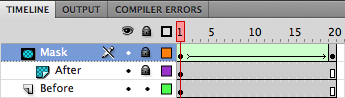
Open the ImageRevealer.fla and edit the MovieClip in the stage, use the Timeline to determine where to place every image and adjust the Mask size to fill the image.
Open the Main.as file and edit the highlighted lines:
package
{
	import flash.display.Sprite;
	import flash.events.MouseEvent;
	import flash.geom.Rectangle;

	public final class Main extends Sprite
	{
		var frame:int = 11; //This is the middle frame

		public final function Main():void
		{
			img.gotoAndStop(11); //Change the frame to show half top, half bottom
			arrows.buttonMode = true;
			addListeners();
		}

		private final function addListeners():void
		{
			arrows.addEventListener(MouseEvent.MOUSE_DOWN, initDrag);
			arrows.addEventListener(MouseEvent.MOUSE_UP, termDrag);
			img.addEventListener(MouseEvent.MOUSE_UP, termDrag);
		}

		private final function initDrag(e:MouseEvent):void
		{
			/* Change the y value (353) to the y of your "arrows" MC
			   Change the width value (300) to the width of your image drag area */

			arrows.startDrag(true, new Rectangle(0, 353, 300));
			stage.addEventListener(MouseEvent.MOUSE_MOVE, revealImage);
		}

		private final function termDrag(e:MouseEvent):void
		{
			arrows.stopDrag();
			stage.removeEventListener(MouseEvent.MOUSE_MOVE, revealImage);
		}

		private final function revealImage(e:MouseEvent):void
		{
			/* This is a tricky part, the default frames in the MC are 20
			   you'll need to calculate the constant according to your frames
			   and image size to reveal the image correctly */

			img.gotoAndStop(Math.floor(arrows.x * 0.07)); //0.07 is the constant here
		}
	}
}

Comments